Sunday 3 August 2008 — This is 18 years old. Be careful.
Apple computers are beautiful, Apple computers are the pinnacle of usability, I grant all of that. But here’s something that for the life of me I cannot figure out. Why don’t the menu symbols for modifier keys (control, alt, shift) appear on the keyboards?
Like any modern operating system, OS X menu items have keyboard short cuts, and because there are so many menu items, they occasionally need modifiers other than the command key. Here’s a menu from Safari:

The command symbol we all understand because it appears on the keyboard, but what are those other two modifiers? Why not print them on the keys?
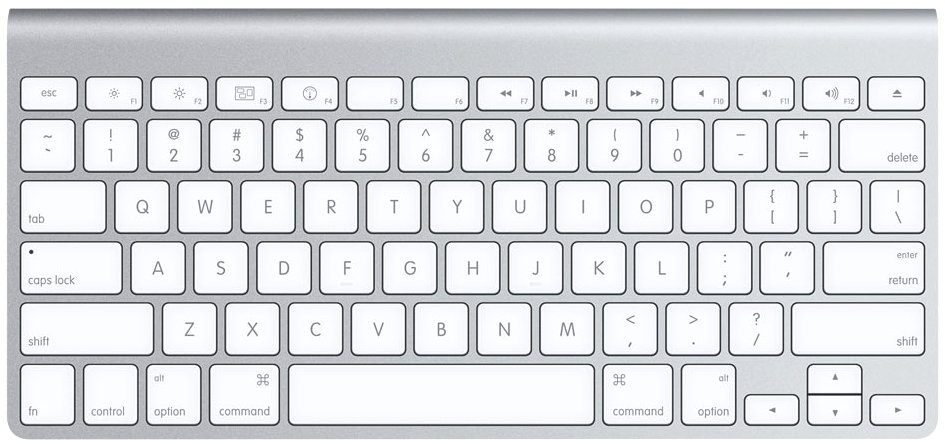
The thingy next to “Show All Bookmarks” is for option, which is labelled on the keyboard with “option” and, alternately, “alt”, but doesn’t have the symbol. The big up-arrow next to “Add Bookmark Folder” is not the up-arrow on the keyboard, but the shift key, which is labelled only with “shift”.
And God forbid you should have to ever Force Quit an application. Is that a Quicktime symbol?:

I must not be the only one who is confused, because Dan Rodney started off his thorough Mac OS X Keyboard Shortcuts page with a translation chart:

Why no symbols on modifier keys? Or, why is the command key special? Why is it labelled with its symbol while the others are not. This seems like a really basic usability rule: refer to the same thing the same way in different contexts. Is there some logic to this, or is it just that the minimalist hardware design gurus win out over the operating system usability guys?
Comments
http://www.iminstant.com/iminstant/iminstant.nsf/d6plinks/CTYR-7GNP8A
That's why I chose the "workaround" of buying a Microsoft Natural keyboard. And there's some good news about them, too: The Microsoft OS X keyboard drivers are not compatible with Apple's Java 6 implementation - the keyboard does not work in Java 6 apps, as for example Netbeans 6.1 with JavaFX. Isn't that beautiful? ;-)
Why four modifier keys? Aren't three enough?
This is why you have the virtual keyboard. Also, I don't know for german but on the french keyboard they're combinations of the parens keys and modifiers (alt or alt and shift, I think, I can type them when I'm using my mac but I don't remember the exact chord)
http://2aday.wordpress.com/2007/08/09/why-the-applecommand-key-finally-lost-its-apple/
Here's an example of an ISO keyboard (German layout):
http://www.tgunkel.de/it/hardware/doc/ibook_g4_linux_data/iBook_G4_keyoard_german.png
I still call the command-key 'open-apple' since there used to be an Open Apple and a Closed Apple on old Apple //es and IIgs's ...
Ugh... the whole thing is like a twisted joke on "usability".
I gave up using Mac keyboard shortcuts because the only symbol I knew was Shift (ok, and Tab and Delete, the delete key is marked and the tab symbol is marked on the windows keyboard with that symbol. Page up, page down, enter (non-keypad) look obvious enough (ok, the windows keyboard enter has that symbol too). Arrow keys are arrow keys.
But yeah. I'd never ever figured out the alt key.
1. To get # requires "alt ⌥" + 3 because ⇧ + 3 = £.
People refer to an "option" key but on current UK keyboards it's labeled "alt ⌥" which I'm fine with as most other keyboards have "Alt" and "Alt GR" and ⌥ is what's used in the menus.
2. ⌃ is labeled "ctrl" but hey, look at any non-Apple keyboard. I would have preferred 'ctrl ⌃'.
If you don't like the US keyboard and you're using English, I recommend a UK keyboard or you could buy a Sharpie.
Seriously?
Is it not below the eject key? It should say "delete" on it.
Shift 2
shift+2= @
alt+shift+2= â„¢
alt=2= €
Command is a beautiful key and more accessible (via thumb) for keying combos than control (via pinky). I sometimes refer to the "apple-key" for the one retard at work that needs that terminology. (To those who get confused about whether to use "control" for commands, your helplessness is non-addressable.)
Yours Sincerely Mr Anthony Cotton
What the frak are these people bitching about? If nobody has told you about Google (really do you suppose anyone on the planet exists who does not understand the phrase "Google it?"), quick! Go ask the first eight year-old you encounter to show you how.
And if you are not quick enough to recognize the quantum gap in elegance between Mac OS and Windows, then you don't deserve the privilege of using a Mac. There is not a problem. You are the problem. Quit whining and and crawl back into that slough of mediocrity whence you mistakenly emerged.
Ditto anyone who asks for "small sticky labels for the keyboard? " First, why? and secondly, doh! Google it. That is why God made search engines so that we would never again have to endure absurd questions from half-wit twits. O.K. Just this once, because I am not really a mean person, simply the variety that does not suffer fools gladly. Here you are:
http://www.google.com/search?sourceid=chrome&ie=UTF-8&q=small+sticky+labels+for+keyboard
When I did not understand the first symbol for "Show all bookmarks" I DID GOOGLE IT. That is how I found this page. How does that make me a half-wit?
How does asking a question mean I do not deserve to own a MAC. I PURCHASED A MAC. That is what makes me deserve having it and learning to use it.
If I managed this site, I would ban you for being rude and calling us fools.
A fool is the person who does NOT ask the experts when they do not understand something.
In His peace,
Elizabeth
in system preferences, go to Keyboard, then hit the box by Show Keyboard & Character Viewers in menu bar. Then look up by the time (at least for me) and there you have it. Show character viewer gives you every symbol you could want. it even recognizes Emoji that i dl'ed. never doubt your keys again! it's official!
great job ned!
and I finally found your article.
cool~!!!
Add a comment: